

Enterprise Suite · Engineered for Industry 4.0
Better demand forecasts. Less inventory. More profit.
OpexFC turns your sales history, orders, customer forecasts and promotions into one approved demand plan per product, plant and month. It tests 16 forecast methods on your own history and recommends the most accurate one. Your planner decides.
- Built for
- PPIC and demand planning teams
- Plans by
- SKU or family, per plant or all plants
- Methods
- 16, from moving average to XGBoost
- Works with
- Your ERP, through Excel and CSV files
- Deployment
- Cloud, hosted by Opex
Sound familiar?
Demand planning has outgrown the spreadsheet
Many workbooks, no single number
Sales, planning and each plant keep their own file. Nobody is sure which version is the current one.
Days of copy-paste every month
Planners merge orders, shipments and customer forecasts by hand before they can even start planning.
One formula for every product
Fast movers, slow movers and new launches all get the same calculation, so the forecast is wrong where it matters most.
A number nobody can explain
When the forecast changes, no one can say who changed it, or why. Management stops trusting the plan.
A wrong demand number costs both ways: missed orders on one side, slow-moving stock on the other. OpexFC replaces the stack of workbooks, not your ERP.
Watch OpexFC in Production
A walkthrough of OpexFC in use.
What you get
From sales data to an approved plan, in one system
Forecasts tested on your own history
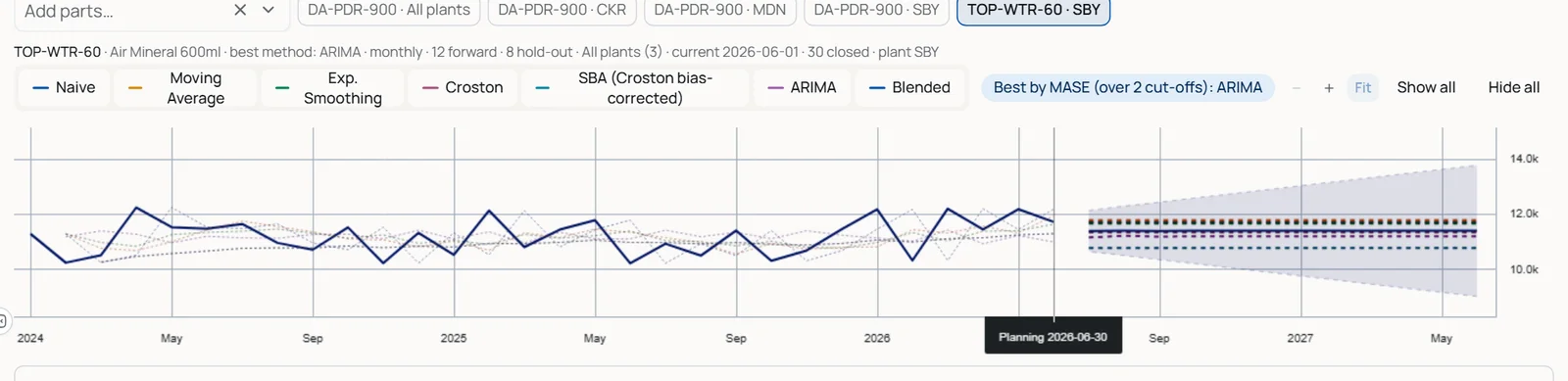
Every eligible method, from moving average and Croston to SARIMA and XGBoost, forecasts months it has not seen. The lowest scaled error (MASE) is recommended, methods that do not fit are shown with the reason, and the planner decides.
One Excel-like grid for the whole team
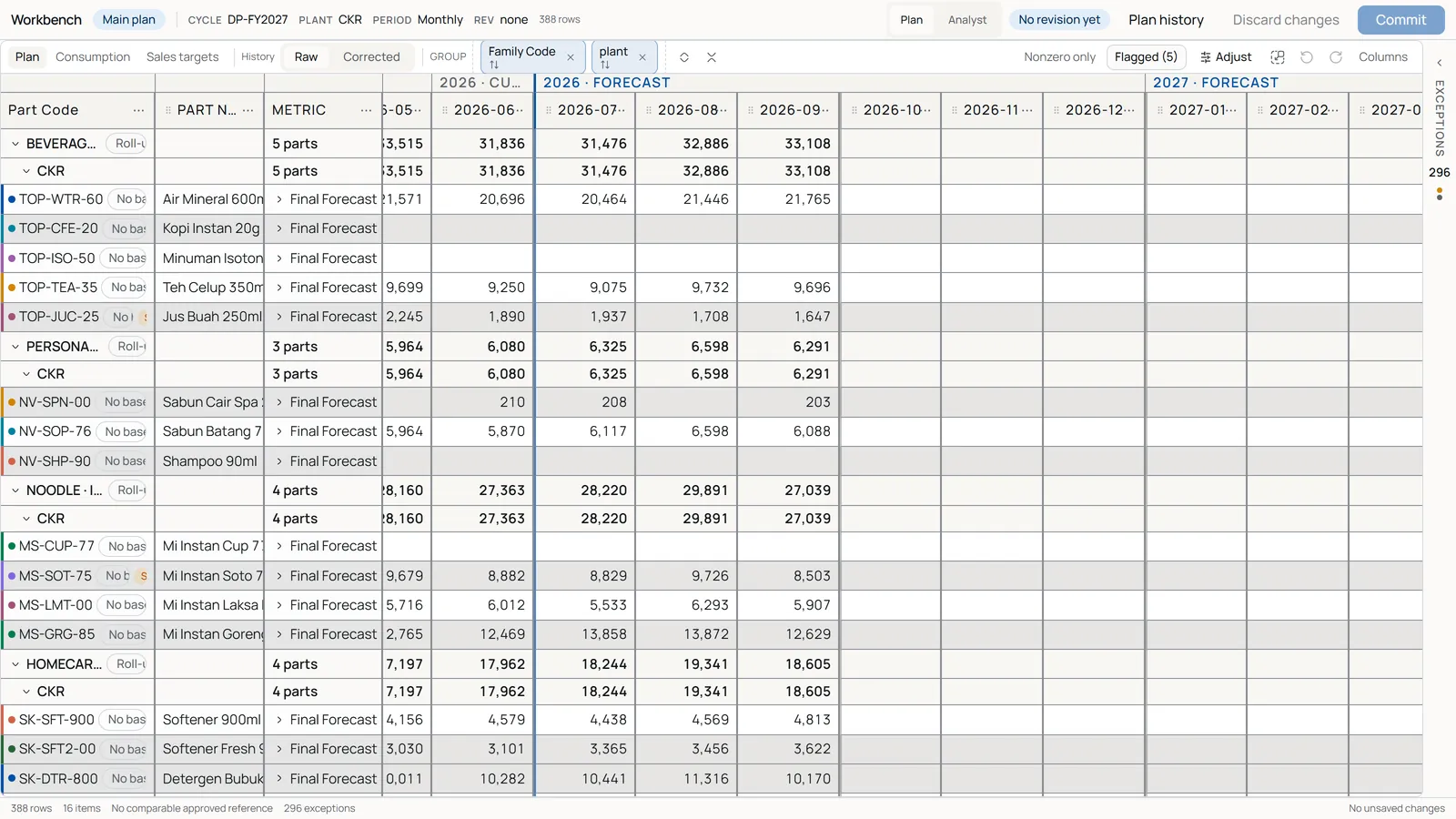
Products grouped by family and plant, history and forecast side by side, with copy-paste, fill and undo. Full-screen mode gives the grid the whole screen.
Exceptions that point to the cell
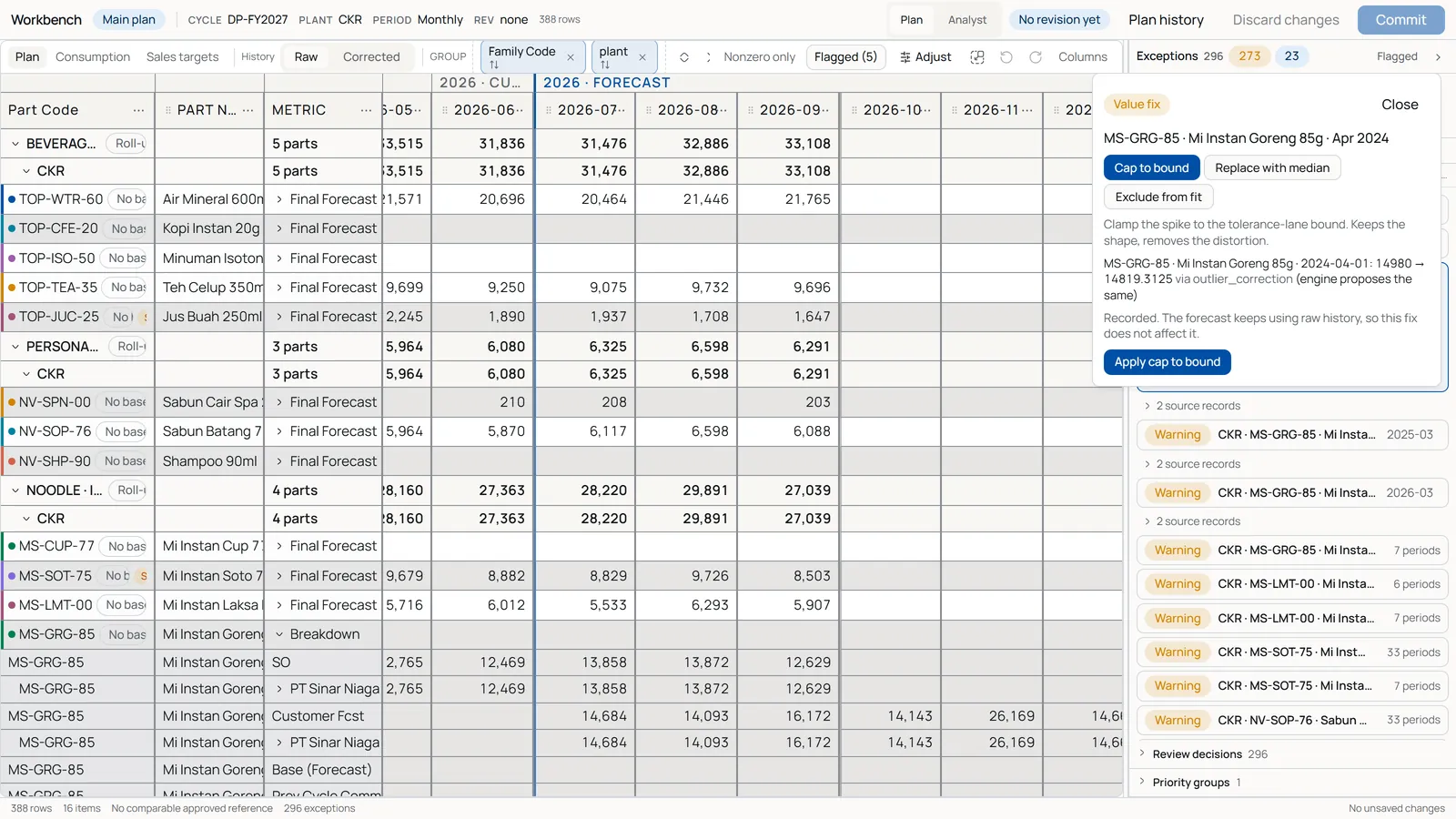
Sudden jumps, extreme or missing values and forecasts far from history are listed beside the grid. Open one and the grid jumps to it: cap the value, replace it with the median, or exclude it from the forecast.
Import Center with a quality check
Templates and saved column mappings for your ERP exports, with a row-by-row report and checks for gaps, duplicates and unknown codes.
Promotions and commodity prices
Planned promotions and price drivers can feed the forecast. They are off by default and used only when they improve the test.
Disaggregate and consolidate
Spread a family or monthly plan down to products, plants, weeks or days, or roll it back up. Every step proves the totals still match.
No double counting
Confirmed sales orders consume the forecast instead of being added on top of it.
Control and reporting
Sign off once. Measure honestly.
Approval with a clear sign-off
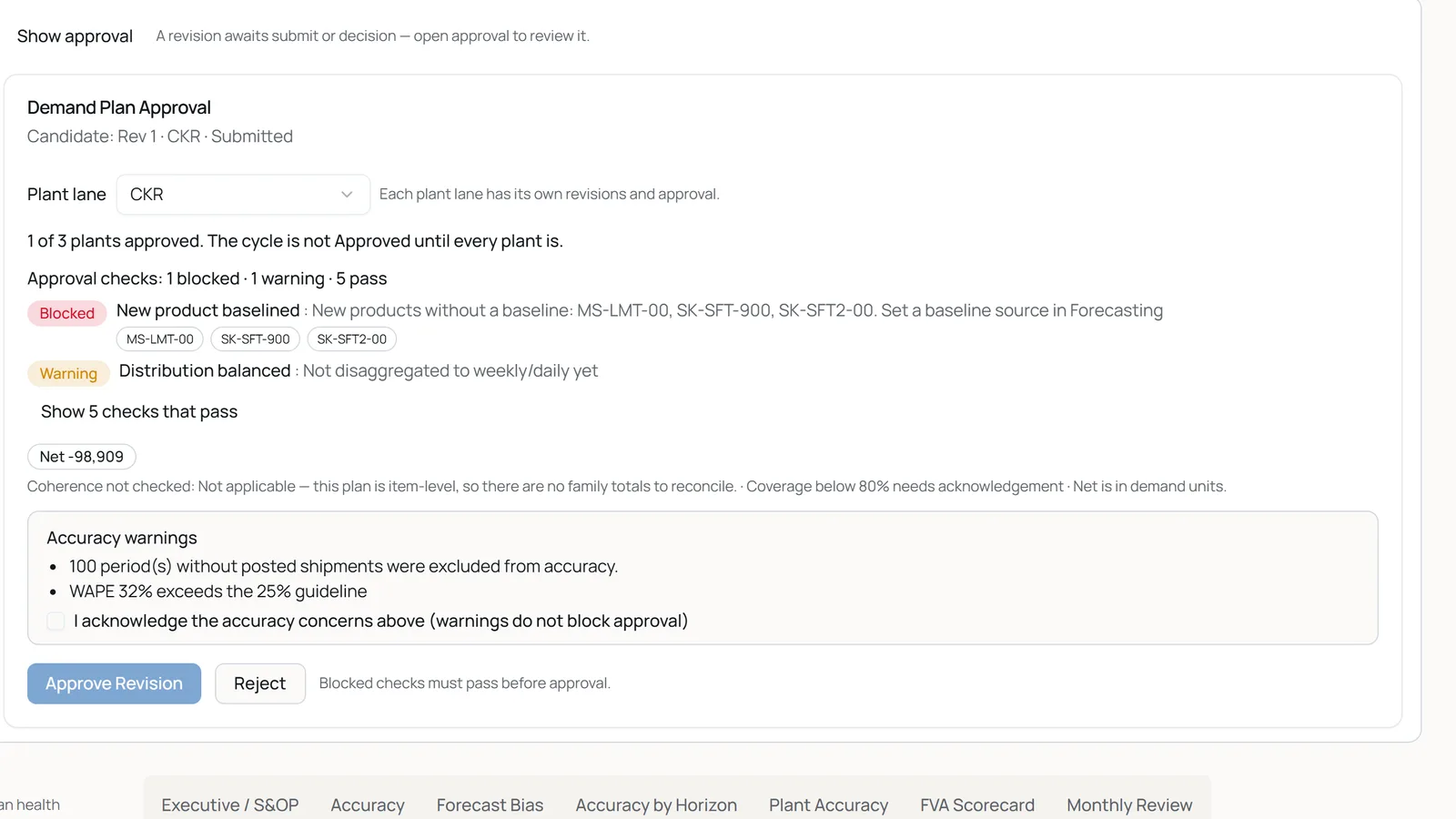
Commit the plan as a named revision with a reason and submit it. The system checks it first: real gaps block approval, accuracy concerns must be acknowledged. Each plant is approved on its own, and the approved plan never changes underneath its users.
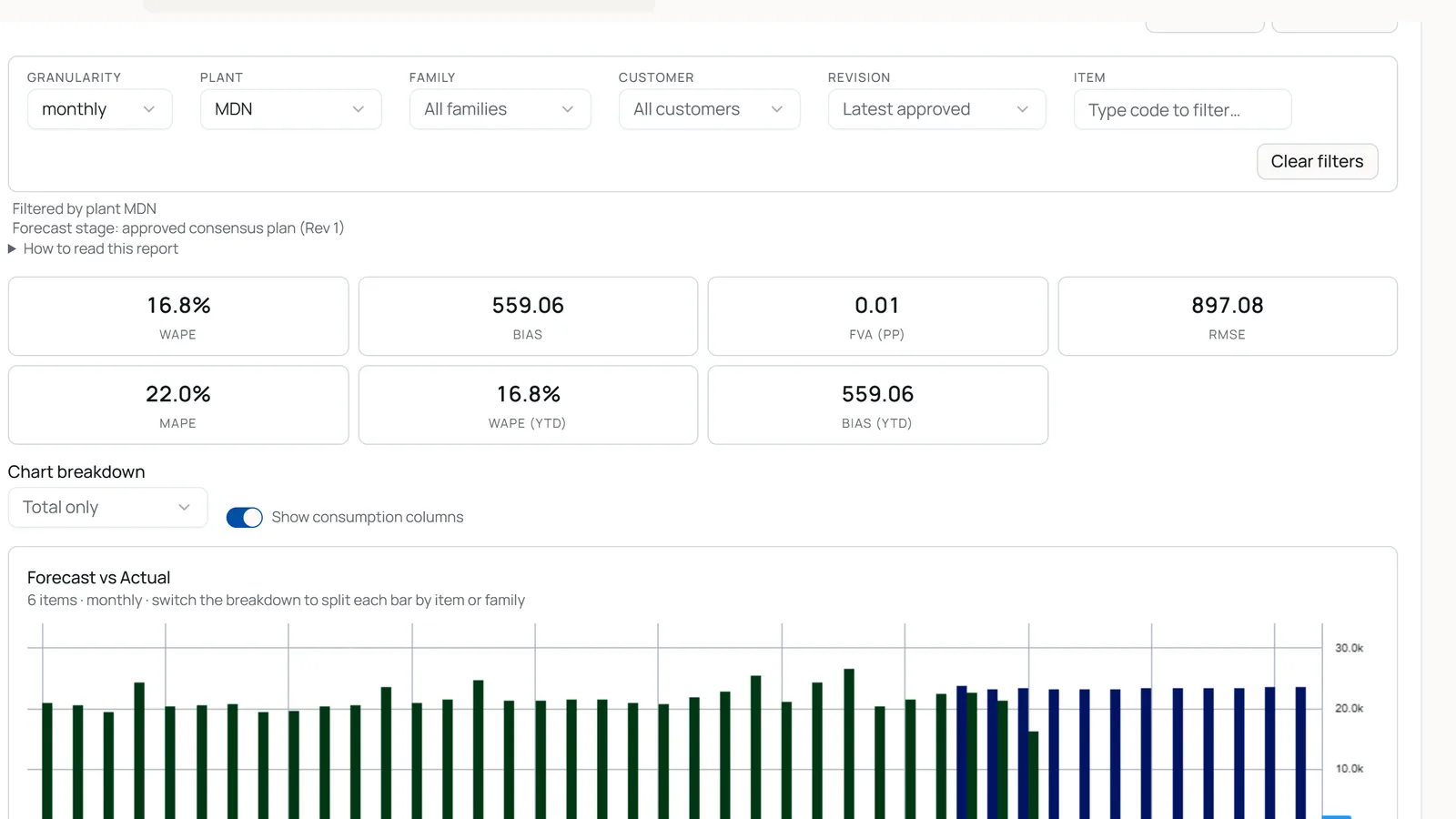
Accuracy, bias and plan vs actual
Reports compare the approved plan with real shipments: accuracy, bias by item, forecast value added and plan vs actual, always stating how many months were measured. A product that was never forecast is never scored as zero.
15 report types
Executive and S&OP, accuracy by horizon and plant, top errors, customer accuracy, planner changes and cycle comparison, all exportable to Excel.
Handoff to your ERP
Export the approved plan as Excel or CSV for production, purchasing and your ERP.
How a planning cycle runs
Five steps, every month, in one system
- 1
Import
Sales orders, shipments, customer forecasts, promotions and master data.
- 2
Forecast
Compare methods on your history and choose the base forecast.
- 3
Review
Work through exceptions, adjust with a reason, spread from family to product to plant.
- 4
Approve
Submit a named revision and sign it off, plant by plant.
- 5
Report
Measure accuracy and bias against actual shipments, then export.
How it works
OpexFC plans demand. Your ERP stays in charge.
OpexFC sits between your ERP data and the people who plan. It takes your sales history and master data, helps the team agree one demand plan, and hands the approved plan back for production and purchasing. It does not replace your ERP, schedule production or plan capacity.
File-based today
Load your ERP exports through templates and saved mappings. A live ERP connection is agreed per project.
Optional drivers
Promotions and commodity prices are off by default and switched on per forecast run.
Each plant on its own
Plan and approve per plant, then roll every plant up to one total.
Planning supply and capacity is a separate step. OpexFC gives it a demand number the team can trust.
Questions planning managers ask us
Does OpexFC replace our ERP?
No. It plans demand and hands the approved plan to your ERP and your production and purchasing teams.
How accurate is it?
We don't quote a number from someone else's data. In a pilot we hold back your most recent months, run every method on your history and show you the error of each one.
Can it handle promotions and price changes?
Yes. Promotions and commodity prices can feed the forecast. They are off by default and switched on per run.
Does it connect to our ERP?
Today OpexFC loads your ERP exports as Excel or CSV files, with saved column mappings, and exports the approved plan the same way. A live connection is agreed per project.
Is it cloud or on-premise?
OpexFC runs as a hosted service, so there is nothing to install. Tell us your data rules and we will confirm the fit before any data is shared.
Does it plan capacity or production?
No. OpexFC plans demand. Capacity and production planning use its approved demand as their input.
How do we start?
With a pilot on your own data: we agree the products, plants and success measures up front, load your files, and run real planning cycles together.
How is it priced?
Pricing depends on your number of plants and products. Talk to us for a quote.
See OpexFC on your own history
In 30 minutes we'll show OpexFC on a sample plant and agree what a pilot on your own data could look like.