
P&L and cash flow forecasting
Forecast the P&L from budget, run-rate or your own assumptions, and project cash for the next 13 weeks from your open AR and AP invoices. Included in Professional, an add-on for Starter.

Financial reporting, forecasting and consolidation
Trial Balance, Balance Sheet, P&L, Equity and Cash Flow synced straight from Epicor Kinetic, with Budget & Forecasting and multi-company Consolidation on top. No more rebuilding statements by hand in Excel every close.
14 days of Professional. No payment details.
Built for Finance teams, Controllers, FP&A analysts on Epicor Kinetic.
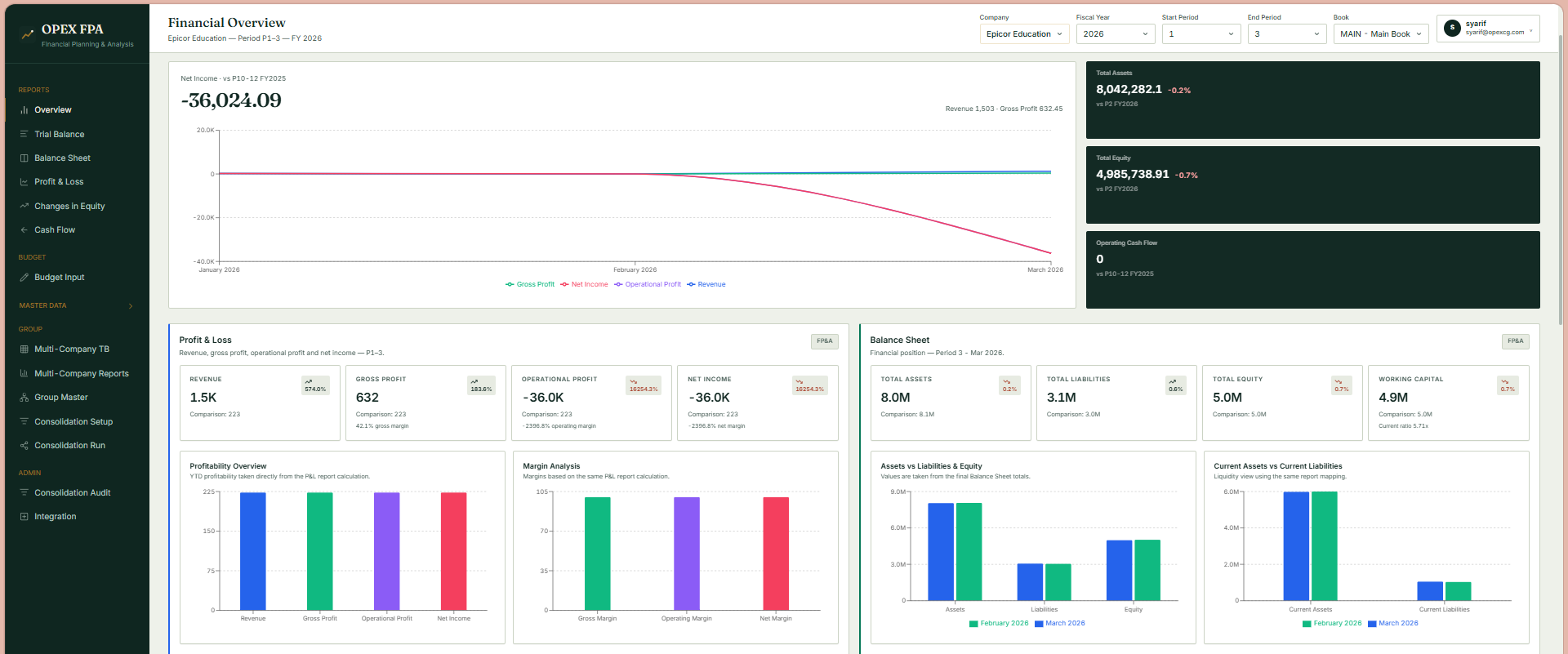
A walkthrough of OpexFinX in use.
Made for finance teams
Forecast the P&L from budget, run-rate or your own assumptions, and project cash for the next 13 weeks from your open AR and AP invoices. Included in Professional, an add-on for Starter.
Multi-company reports, consolidation runs, intercompany mapping and the consolidation audit. Included in Enterprise, an add-on for Professional. Rules live in the app, not in lookup tabs.
Connections are provider-swappable (Epicor today, SAP-ready adapter), credentials are AES-256-GCM encrypted, and endpoints are derived from a single base URL.
A first-run wizard tests your Epicor connection, saves it encrypted, and runs the initial sync of companies, books, segments, GL accounts, categories and fiscal calendar.
The portal and this site run on Cloudflare Workers. Your data lives in Cloudflare D1, scoped to your workspace, so there are no servers for your team to patch.
Available on Professional and the 14-day trial
The AI works from your synced Epicor numbers, and you review what it produces.
Describe the dashboard you want and the app drafts it. Then ask for changes, such as adding a budget comparison for revenue or limiting the cost charts to six months.
Describe how accounts should be forecast and the AI writes the rule set. Every rule is checked against your real accounts, and errors come back so they can be fixed before anything runs.
Ask a question about your numbers and get an answer that cites its sources, so you can check it before you repeat it.
Fixed checks run over your GL journal lines and raise findings. For each finding the AI explains what was flagged, using your account history. It never decides whether something is an error, and you confirm or dismiss each finding yourself.
Builds the period's board pack from the same numbers as your reports and exports it to Excel.
Simple setup
Paste your OData BaqSvc root, pick an auth method, and the wizard verifies it against a live BAQ before saving anything.
Companies, books, account segments, GL accounts, report categories and the fiscal calendar are pulled and staged automatically.
Open any statement, drill into journal details, and sync fresh data whenever you need it.
Packages
Try Professional free for 14 days, no payment details needed. Talk to sales for a quote based on your entities and users.
One company, three users, every financial report.
Pricing on request
Ask sales for a quote.
Three companies, five users, with forecasting and the AI assistant.
Pricing on request
Ask sales for a quote.
Custom entity count, ten users, consolidation and priority support.
Contact sales
Priced to your entities and SLA.
Sign up with your email and you get 14 days of the Professional plan. No payment details are asked for. Buy a plan before the trial ends to keep your workspace going.
Checkout runs on DOKU. You can pay by bank transfer, virtual account or card, and each purchase comes with an invoice. The first invoice is setup plus the first year, and renewals are the annual fee only. Tax is added per invoice. Enterprise is invoiced through our sales team.
The app runs on Cloudflare Workers and stores data in Cloudflare D1. Every workspace's data is scoped to its own tenant. If you have a region or residency requirement, tell us through the contact form before you buy. Details are on the privacy page.
Yes. OpexFinX only reads from Epicor Kinetic: Trial Balance, GL Budget, and master data. Nothing changes in how your team works inside Epicor.
Report Writer is built in but rigid, and customizing drill-down or multi-period comparisons usually needs IT or a consultant. OpexFinX is designed to give Finance more self-service reporting capabilities.
Yes. The forecast engine can use a trailing run-rate for accounts without a Budget line and distinguish budget-driven months from run-rate months.
Sign up with your email, connect Epicor, and see your own trial balance.